[■]LeagueApps Programs Widget
The Problem
The St. James embedded a vendor-provided JavaScript widget to display youth sports programs on their marketing site. The widget pulled program data from the LeagueApps registration platform and rendered it inline. In practice, it created three distinct problems.
::Marketing Bottleneck
Any change to the widget — adding a new sport, adjusting filters, updating display settings — meant reaching out to the vendor to get a new configuration instance. The marketing team couldn't make changes themselves, and it happened often enough to be a bottleneck.
::Privacy Violation
The vendor widget loaded Google Analytics tracking scripts from a third-party account on every page view, without user consent and outside the site's own analytics configuration. This injected tracking into a context the site operators didn't control and couldn't opt users out of — a clear privacy compliance issue.
::History Corruption
Because the site was a Vue SPA, the vendor widget's internal navigation conflicted with Vue Router's history management. Clicking the browser back button after interacting with the widget produced broken navigation states — sending users to unexpected pages or trapping them in loops. The widget was effectively breaking a core browser interaction.
The Solution
Rather than patching around the vendor widget's issues, I built a replacement from scratch as a Web Component. The goal was a drop-in <programs-widget> element that could be configured entirely through HTML attributes, required no build step from the host site, and ran independently of the host application's framework.
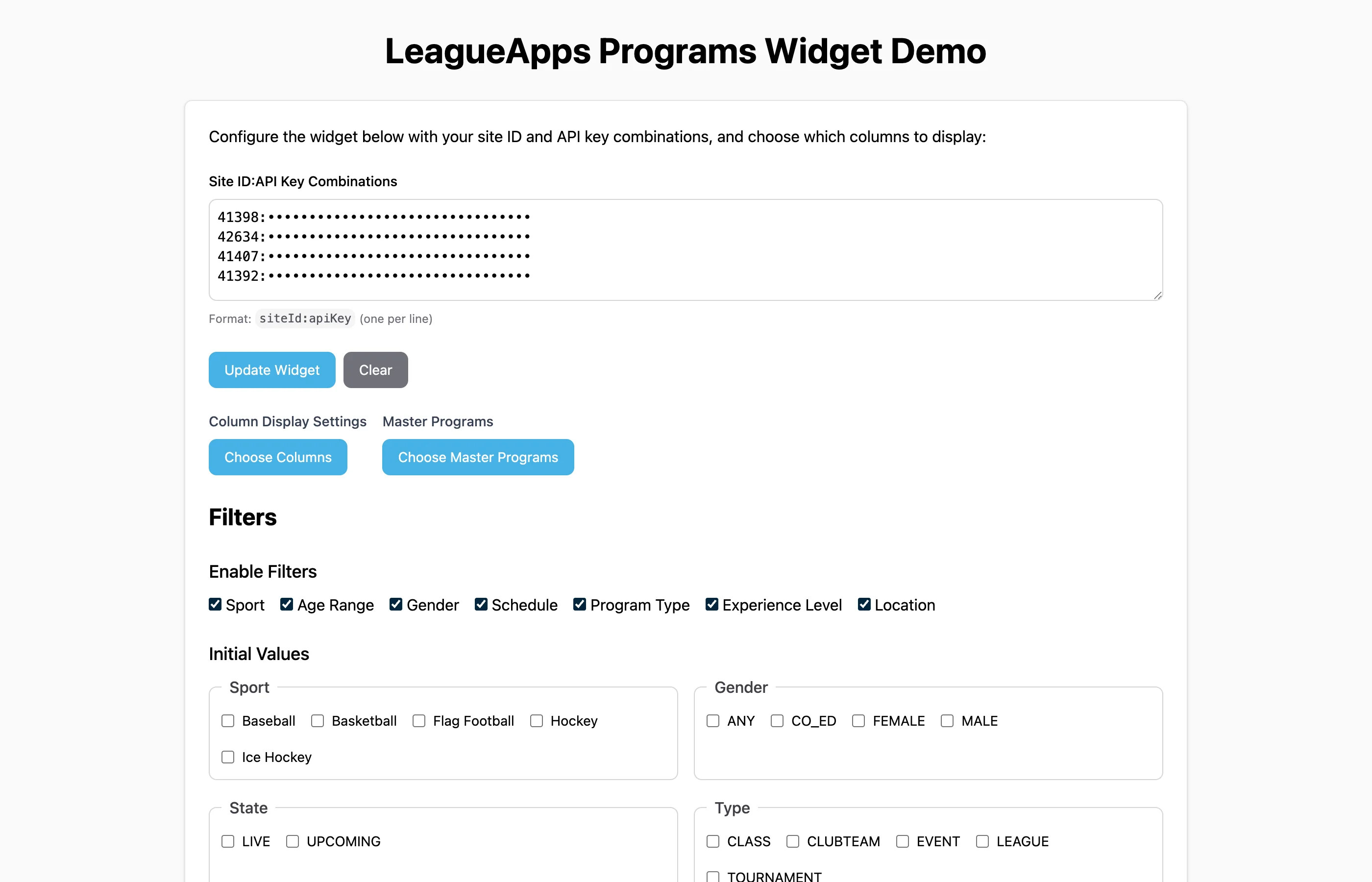
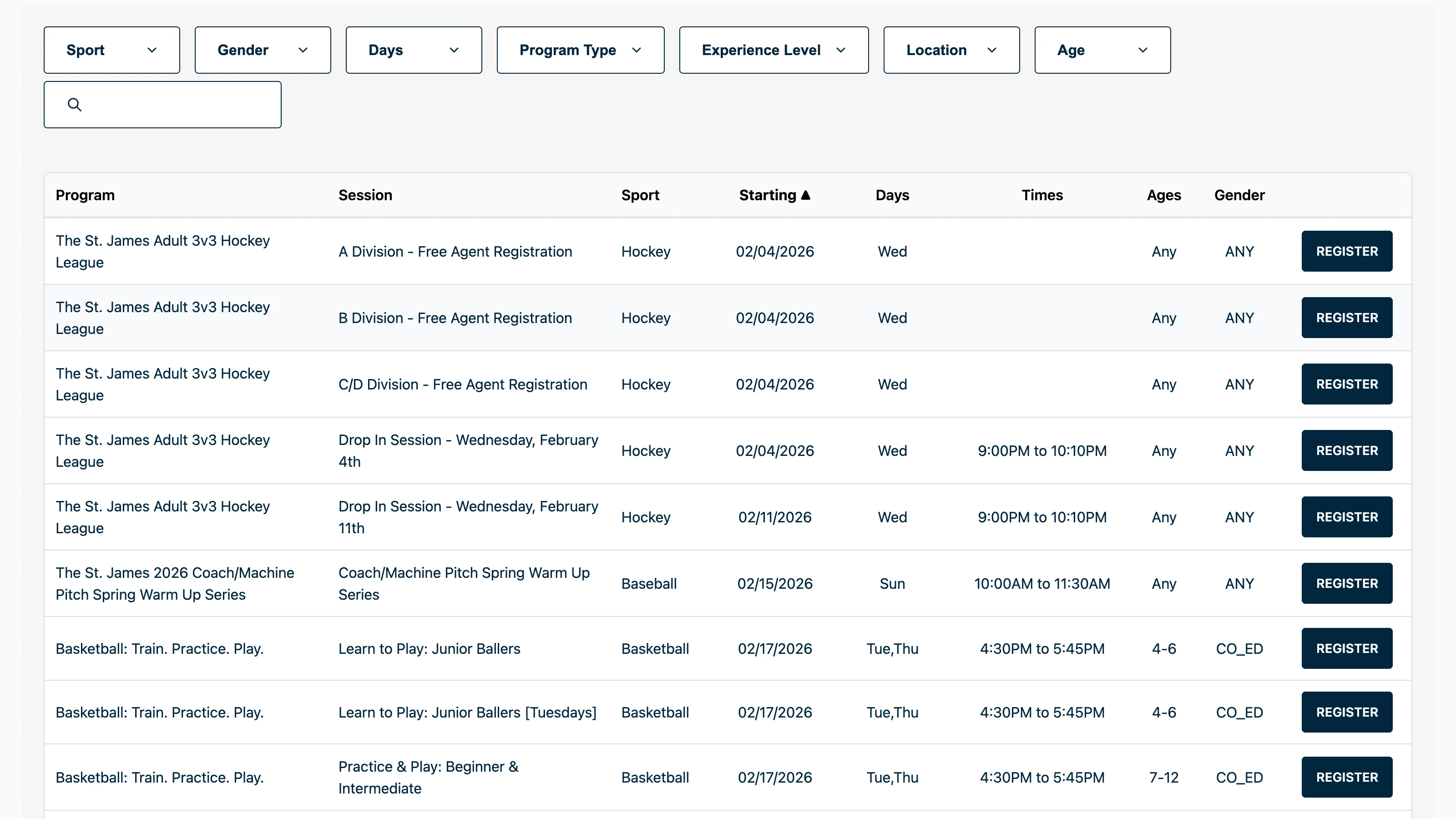
The widget fetches program data directly from LeagueApps public API endpoints, transforms and reshapes it into a filterable data table, and renders everything inside a Shadow DOM boundary. Configuration is declarative — the marketing team sets attributes like data-sites, data-filter-sport, and data-columns directly in the CMS without touching code.
Deployed to Cloudflare Workers as a single JavaScript file that any page can load with a <script> tag.
Architecture
::Component Architecture
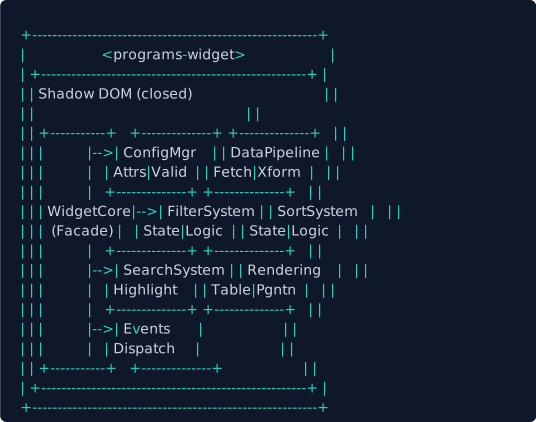
The widget uses a Facade pattern to coordinate internal subsystems. ProgramsWidget (the Custom Element) delegates to WidgetCore, which orchestrates data, filtering, sorting, search, rendering, and events — each implemented as independent modules with their own state managers and logic.
::Data Pipeline
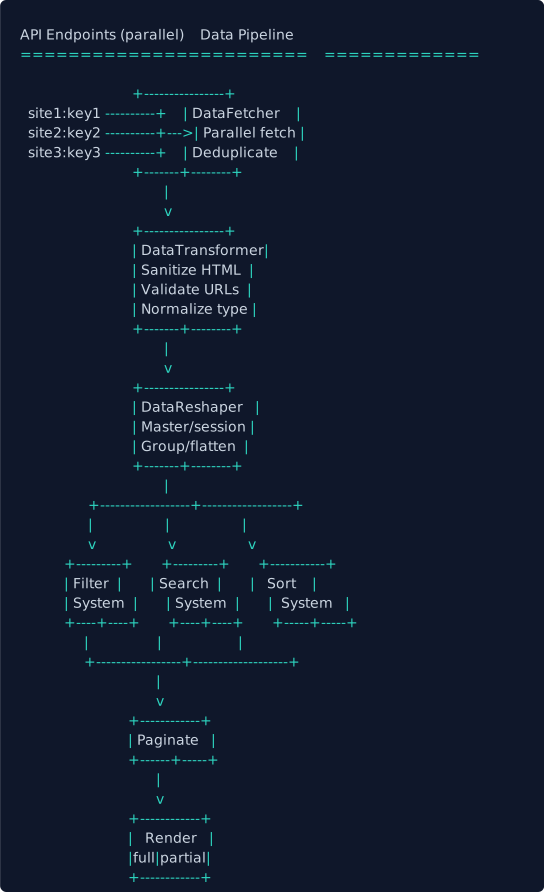
Program data flows through a three-stage pipeline: parallel fetch with deduplication, HTML sanitization and type normalization, then master/session grouping into a flat table structure. The processed data feeds into filter, search, and sort systems before pagination and rendering.
::Filter Architecture
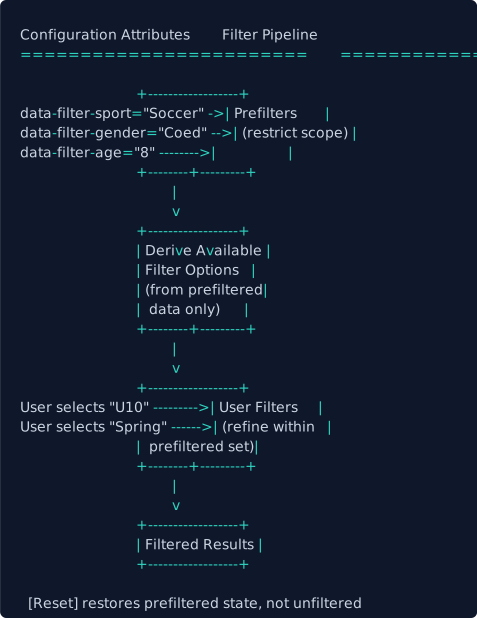
The filter system uses a two-tier model — prefilters (set via HTML attributes) restrict the available dataset, then user-applied filters refine within that scope. Filter options are dynamically derived from the prefiltered data, so users only see options that exist in the current dataset.
Design Decisions
::Why Web Components
The original host site ran Nuxt 2 (Vue 2), but the widget now runs across multiple domains — WordPress sites, static pages, and other CMS platforms. A framework-specific component would mean bundling a runtime, managing version conflicts, and coupling the widget's lifecycle to each host app. A Custom Element with Shadow DOM avoids all of this — the widget loads as a single script, registers itself, and runs in complete isolation. No framework dependency, no build integration, no assumptions about the host environment.
::Shadow DOM for Real Isolation
The vendor widget's CSS collided with site styles and vice versa. Shadow DOM provides genuine encapsulation — the widget's styles don't leak out, the host's styles don't bleed in. Using closed mode prevents external JavaScript from reaching into the widget's internals, which matters when running inside a CMS where other scripts are unpredictable.
::Facade Pattern for Complexity Management
The widget coordinates data fetching, transformation, filtering (with parser and state manager), sorting, search (with highlight management), pagination, rendering, events, and configuration. That's 15+ modules. The Facade pattern gives ProgramsWidget a simplified API — it calls core.initialize() and core.handleFilterChange() without knowing that each call orchestrates half a dozen subsystems.
::Constructable Stylesheets
Traditional <style> injection in Shadow DOM creates a new stylesheet per instance. Constructable Stylesheets (new CSSStyleSheet() + adoptedStyleSheets) share a single parsed stylesheet across all instances. The widget includes a fallback to <style> injection for older browsers.
::Dual Build Configuration
Two Vite configs produce two outputs: an IIFE bundle (programs-widget.js) for production embedding via <script> tag, and a full Vue 3 application for the development sandbox. The sandbox provides a live testing environment with controls for every attribute and event, while the production build is a single file with no external dependencies.
::CSS Custom Highlight API for Search
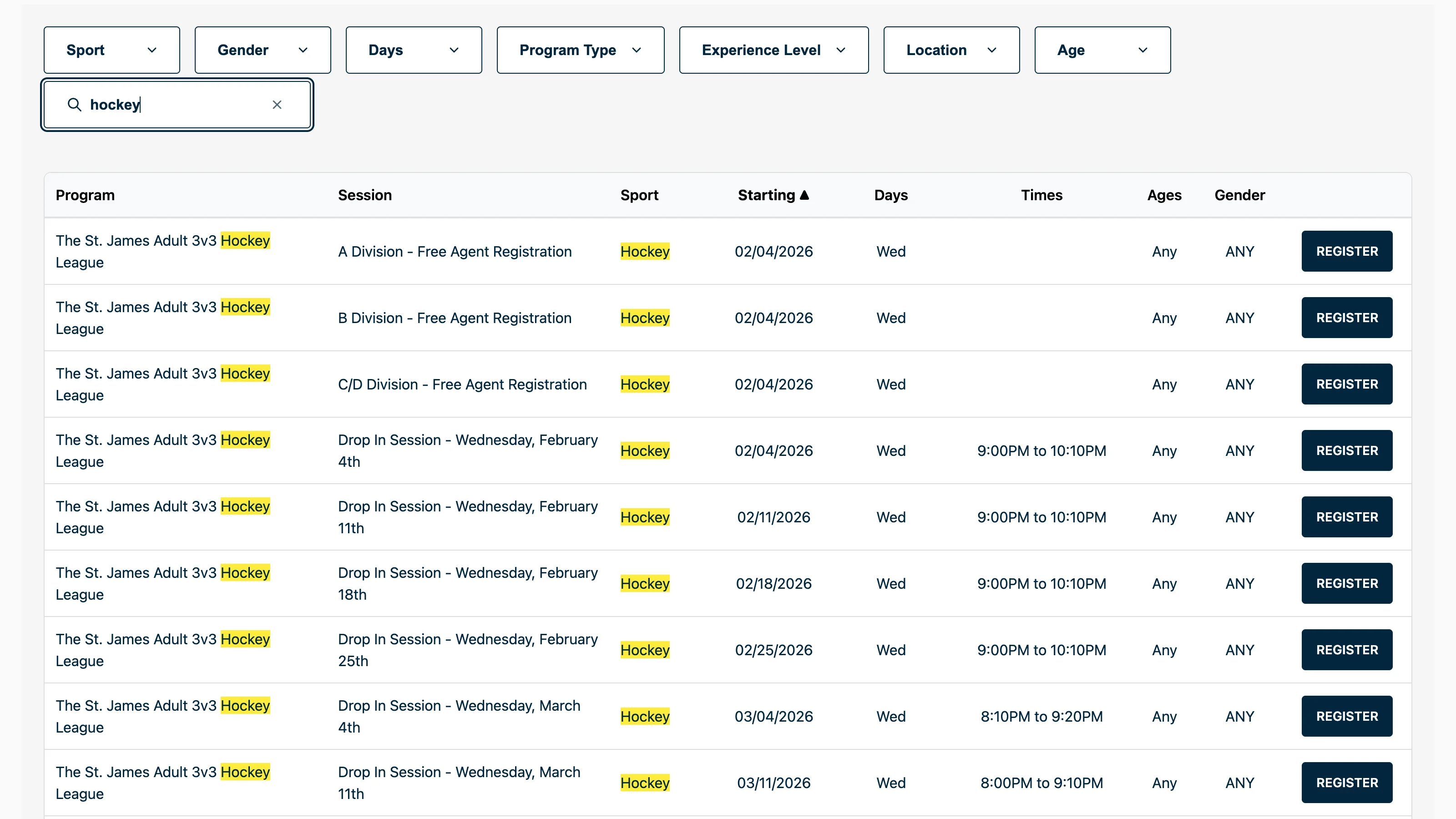
Search highlighting typically means wrapping matches in <mark> elements — which means modifying the DOM, re-triggering layout, and managing cleanup. The CSS Custom Highlight API highlights text ranges via CSS pseudo-elements without touching the DOM. A TreeWalker finds matching text nodes, creates Range objects, and registers them as a named highlight. The highlight renders via ::highlight(pw-search-highlight) in CSS.
::Filter State Separation
Filter state is split into three layers: initial state (from attributes at load time), prefilter state (configuration-level restrictions), and current state (user interactions). This separation means resetting filters restores the prefiltered state, not the unfiltered state — the marketing team's configuration acts as a permanent scope.
::Partial Re-Renders
Typing in the search input triggers filtering on every keystroke. Full re-renders would destroy and recreate the entire table DOM, losing focus and scroll position. The widget detects when a partial update is sufficient — replacing only the <tbody>, sort indicators, and pagination controls while preserving the rest of the DOM structure.
Key Features
- Filterable data tables with faceted filtering across sport, gender, age, type, season, experience level, location, and schedule day
- Schedule day matching with "any" and "all" modes — find programs on any of the selected days or all of them
- Real-time search across 14 fields with CSS Custom Highlight API for non-destructive text highlighting
- Sortable columns with type-aware comparisons (numeric, date, day-of-week order, locale-aware strings)
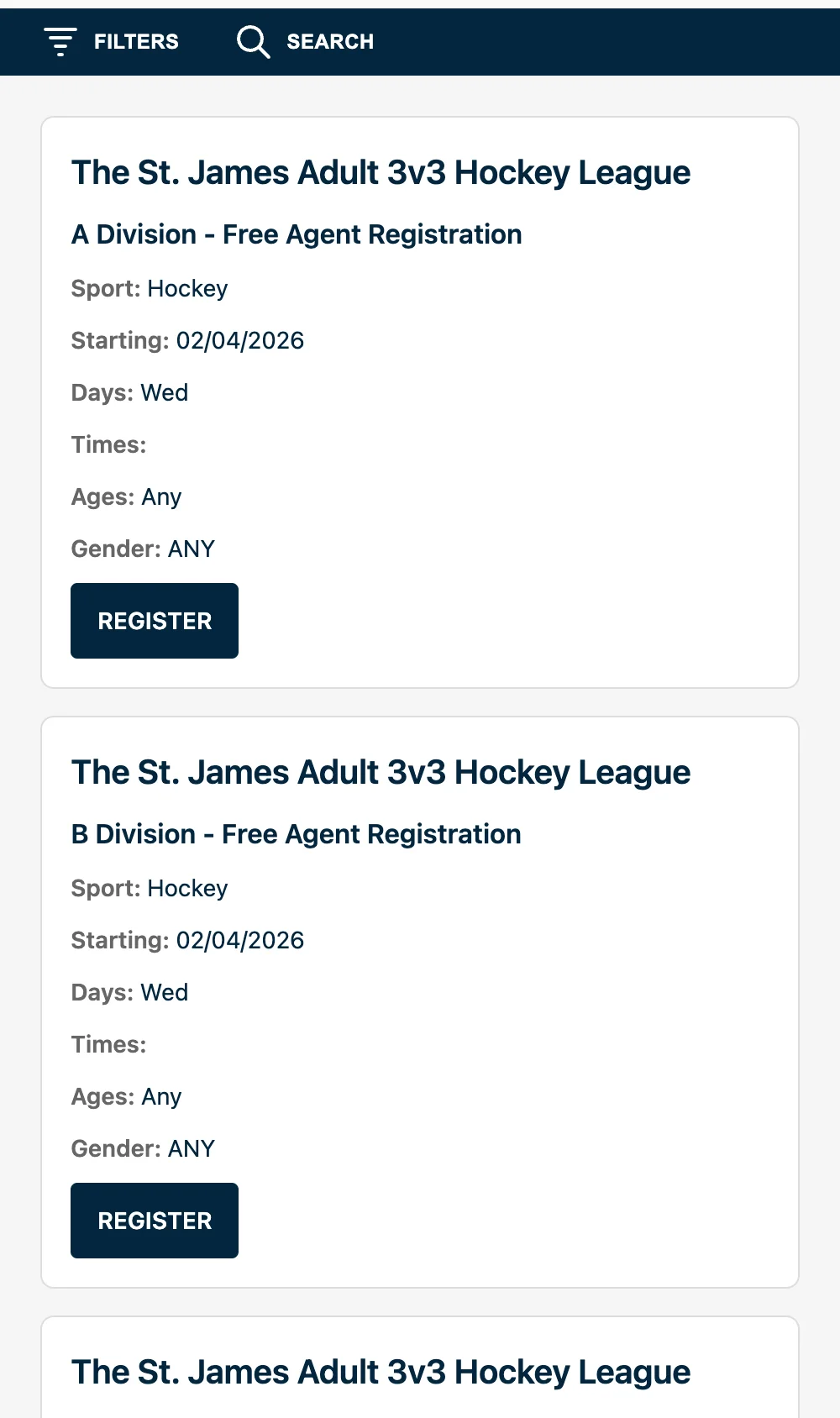
- Mobile-first responsive design using CSS container queries on the Shadow DOM host
- Consent-based tracking — no analytics scripts load without explicit opt-in, replacing the vendor widget's unconsented third-party tracking
- XSS prevention — all API data is HTML-escaped through a
textContentsetter before rendering; URLs are validated and normalized - Declarative configuration — every setting exposed as an HTML attribute, configurable through any CMS
- Parallel data fetching across multiple API endpoints with deduplication by program ID
- Master/session grouping — programs with multiple sessions display as grouped rows with shared metadata
- Custom Element lifecycle — handles property-to-attribute reflection, pre-upgrade property assignment, and cleanup on disconnect
- CSS
::part()selectors — host sites can style specific widget internals without breaking encapsulation
Tech Stack
- Vue 3 — component framework (development sandbox)
- TypeScript (strict mode) — type safety across 181 source files
- Custom Elements API —
<programs-widget>registered viacustomElements.define() - Shadow DOM (closed mode) — style and DOM encapsulation
- Constructable Stylesheets — efficient shared styling with
<style>fallback - CSS Custom Highlight API — search highlighting without DOM modification
- CSS Container Queries — responsive layout based on widget width, not viewport
- Popover API — native filter dropdowns without manual positioning
- Tailwind CSS v4 — utility-first styling (via
@tailwindcss/vite) - Vite — dual build config (IIFE widget bundle + Vue dev app)
- Cloudflare Workers — edge deployment via Wrangler
- Bun — runtime and package manager
Screenshots